Short answer: in the ChatGPT desktop app, sign out and sign in with the other account. In the Codex CLI, run codex logout, then codex login. The IDE extension shares the CLI's login, so it changes with it. All three read the same folder, so switching one switches them all. To stop switching, give each account its own CODEX_HOME for the CLI, or its own copy of the app with Sessions Pro for Codex.
Free 1-hour preview once you've signed in to a profile. For macOS 14 or later, or Windows 10 or 11, with the ChatGPT desktop app.
Switch accounts in each place
- In the ChatGPT desktop app: sign out from the app's account menu, then sign in with the other account. Codex in the app now runs on that account.
- In the Codex CLI:
log out, then log in. A browser window opens for the sign-in; choose the other account there.codex logout codex login - In the IDE extension: OpenAI's docs say the CLI and the IDE extension share one login, so switching in the CLI switches the extension. Reload the editor window if it still shows the old account.
- Check which account is active:
run this before you start a long task.codex login status
Why does switching one switch them all?
The desktop app, the CLI and the extension keep Codex's login in the same place: the CODEX_HOME folder, which is ~/.codex unless you set it. Where Codex stores its login. Sign out in one and the others are signed out too, which surprises people the first time: why codex logout signs you out everywhere.
What you lose each time
- Your place. You leave the thread you were in and have to find it again after signing in.
- Time. Every switch is a sign-in, often with a code from your phone or your company's sign-in page.
- The other account. While one is signed in, the other can't do anything.
How to stop switching
- CLI: a folder per account. Start the second account with its own folder and both stay signed in:
CODEX_HOME=~/.codex-work codex. Mac and Windows commands. - A switching tool. Free tools save each login and swap the active one without a new sign-in. Still one account at a time, with a restart. How they work.
- An app per account. Each account its own copy of the ChatGPT desktop app, all signed in at once.
Every account, already signed in.
Sessions Pro for Codex runs the ChatGPT app you already have once per account: its own app with a Dock icon on a Mac, its own titled window on Windows. Each stays signed in to its own account, so changing accounts is changing windows.
Each keeps its own chats, Codex threads, projects and pins, and "Codex CLI in Terminal" opens the CLI on the same account, so the app and the CLI never disagree about who is signed in. Try it free for an hour once a profile is signed in; then it's $15 once for two computers, Mac or PC, with a 14-day refund.
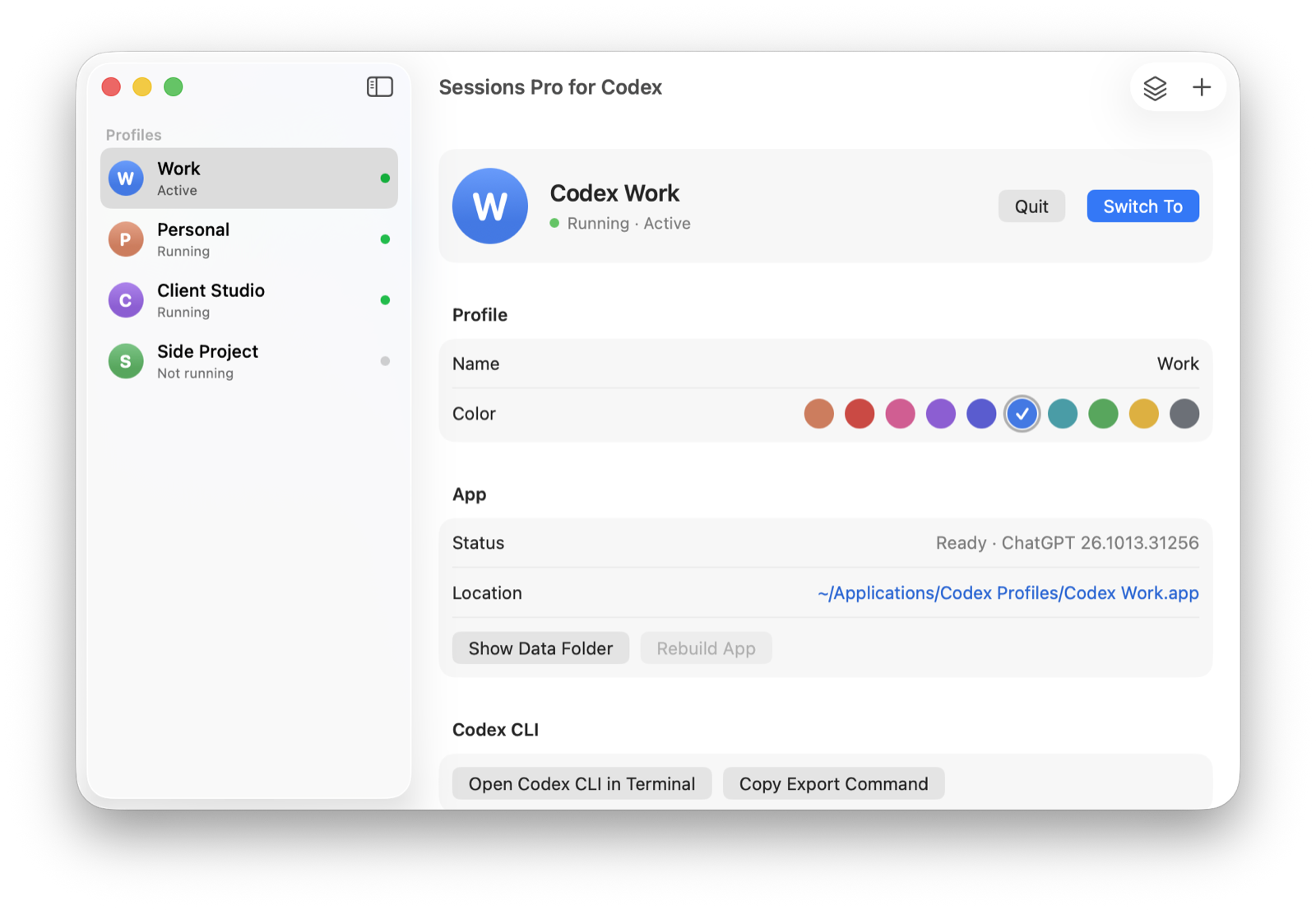
Example accounts. We make Sessions Pro for Codex.
 Sessions Pro for Codex
Free 1-hour preview · 14-day refund · 2 computers, Mac or PC
Is the switch for a second job or a client? See are multiple Codex accounts allowed?
FAQ
How do I change the account in Codex?
In the ChatGPT desktop app, log out from the account menu and sign in with the other account. In the Codex CLI, run codex logout, then codex login.
How do I switch Codex accounts in VS Code?
The Codex IDE extension shares the CLI's login. Run codex logout and codex login in a terminal, then reload the editor window.
How do I see which Codex account I am using?
Run codex login status in a terminal, or open the account menu in the ChatGPT desktop app.
Why did the desktop app sign out when I logged out of the CLI?
They share one login in the CODEX_HOME folder, ~/.codex by default. Give each account its own folder and they stop affecting each other.
Can I switch Codex accounts without logging out?
Yes. Give each account its own CODEX_HOME in the CLI, use a login-swapping tool, or run each account as its own app with Sessions Pro for Codex so they all stay signed in.
Sessions Pro for Codex is made by LEX GLOBAL IT S.R.L. and is not affiliated with, endorsed by or sponsored by OpenAI. It runs the official ChatGPT app with accounts you already have, and OpenAI's terms apply to each account. ChatGPT and Codex are trademarks of OpenAI.