Short answer: Codex has no account switcher of its own in the ChatGPT desktop app or the CLI. ChatGPT's built-in account switcher covers the web and the mobile apps only. Most community switchers work by swapping the saved login, so one account is active at a time and you restart Codex after each change. Sessions Pro for Codex takes the other route: every account runs as its own app, all signed in at once, with a switcher in the menu bar or tray to jump between them.
Free 1-hour preview once you've signed in to a profile. For macOS 14 or later, or Windows 10 or 11, with the ChatGPT desktop app.
Does Codex have an account switcher?
Not where you use Codex. OpenAI's account switching keeps up to two ChatGPT accounts signed in, one active at a time, on ChatGPT web and in the iOS and Android apps. The ChatGPT desktop app, where Codex runs, isn't on that list, and the Codex CLI has only codex login and codex logout.
So in the desktop app and the CLI, changing accounts means signing out and back in. The steps for each.
Two kinds of account switcher
- Swap the login. Free community tools save each account's login and put the one you pick in place. One account is active at a time, and you restart the CLI or the app after switching. Three of them compared.
- A folder per account. Give each account its own
CODEX_HOMEand both logins work at once, with nothing to swap. Free for the CLI, with a command to remember per account. It does nothing for the desktop app. - An app per account. Each account gets its own copy of the ChatGPT desktop app and its own Codex folder, so they all stay signed in and open together. This is what Sessions Pro for Codex sets up for you, on Mac and Windows.
What switching costs you
- One account at a time. While the work account is active, the personal one isn't. A long Codex task on one blocks the other.
- A restart per switch. Codex reads its login when it starts, so the CLI or the app has to be restarted to pick up the change.
- One shared folder. Tools that swap only the login leave the rest of
~/.codexshared, so both accounts see the same local threads and settings.
A switcher with nothing to switch.
Sessions Pro for Codex is an account manager for the ChatGPT desktop app on Mac and Windows. Each account is a profile that opens as its own app: its own Dock icon on a Mac, its own titled window on Windows. All of them stay signed in, so "switching" is clicking the other window.
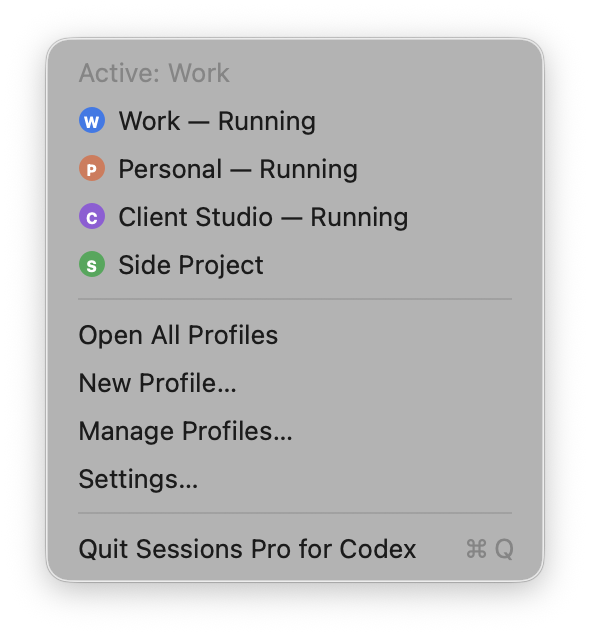
The menu bar on a Mac, or the tray on Windows, lists every profile: click one to bring it forward or open it. Each has its own login, chats, Codex threads, projects, pins and Codex CLI. Try it free for an hour once a profile is signed in; then it's $15 once for two computers, Mac or PC, with a 14-day refund.
| Sign out and in | Login-swapping tools | Sessions Pro for Codex | |
|---|---|---|---|
| Accounts usable at once | 1 | 1 | All of them |
| Restart after switching | ✕ Sign in again | ✕ Restart Codex | ✓ Nothing to restart |
| Works in the desktop app | ✓ | Varies by tool | ✓ |
| Threads kept apart per account | ✕ | ✕ Usually a shared folder | ✓ |
| Cost | Free | Free | $15 one-time |
Example accounts. We make Sessions Pro for Codex.
 Sessions Pro for Codex
Free 1-hour preview · 14-day refund · 2 computers, Mac or PC
Comparing it with OpenAI's own switcher? See ChatGPT's account switcher vs Sessions Pro for Codex.
FAQ
Is there an official Codex account switcher?
Not in the ChatGPT desktop app or the Codex CLI. OpenAI's account switching works on ChatGPT web and in the iOS and Android apps, with up to two accounts signed in and one active at a time.
How do Codex account switcher tools work?
Many save a copy of each account's login and swap the active one into Codex's folder, which is why one account is active at a time and you restart Codex after switching.
Can I switch Codex accounts without logging out?
Yes, in two ways: a login-swapping tool changes the active account without a new sign-in, or you give each account its own folder or app so both stay signed in and there is nothing to switch.
Is there a Codex account manager for Mac and Windows?
Sessions Pro for Codex is one: it keeps a profile per ChatGPT account, runs each as its own app, and lists them in the menu bar on a Mac or the tray on Windows, with each account's Codex usage.
Is it allowed to use multiple Codex accounts?
Sessions Pro for Codex runs the official ChatGPT app with accounts you already have, such as a work account and a personal one. It doesn't change how ChatGPT or Codex work, and OpenAI's terms apply to each account. Use it for accounts you're allowed to have, not to get around usage limits.
Sessions Pro for Codex is made by LEX GLOBAL IT S.R.L. and is not affiliated with, endorsed by or sponsored by OpenAI. It runs the official ChatGPT app with accounts you already have, and OpenAI's terms apply to each account. ChatGPT and Codex are trademarks of OpenAI.