Sessions Pro for Codex is an app for Mac and Windows that runs several ChatGPT and Codex accounts at the same time, each as its own app. OpenAI's ChatGPT desktop app signs in to one account at a time, so switching means signing out and back in. Sessions Pro for Codex runs a separate copy of the official app for every account, all signed in at once. Get it here for Mac, or from the Microsoft Store for Windows.
Free 1-hour preview once you've signed in to a profile. For macOS 14 or later, or Windows 10 or 11, with the ChatGPT desktop app.
What is Sessions Pro for Codex?
It's an account manager for the ChatGPT desktop app, the app that includes Codex (it was called the Codex app until July 2026). You make a profile for each account, for example "Codex Work", "Codex Personal" and one per client, and each one opens as its own app that stays signed in.
Why not ChatGPT's own account switcher? It only works on the web version, chatgpt.com, which doesn't help if you build real projects in the desktop app. Sessions Pro for Codex works in the desktop app, with every account open side by side.
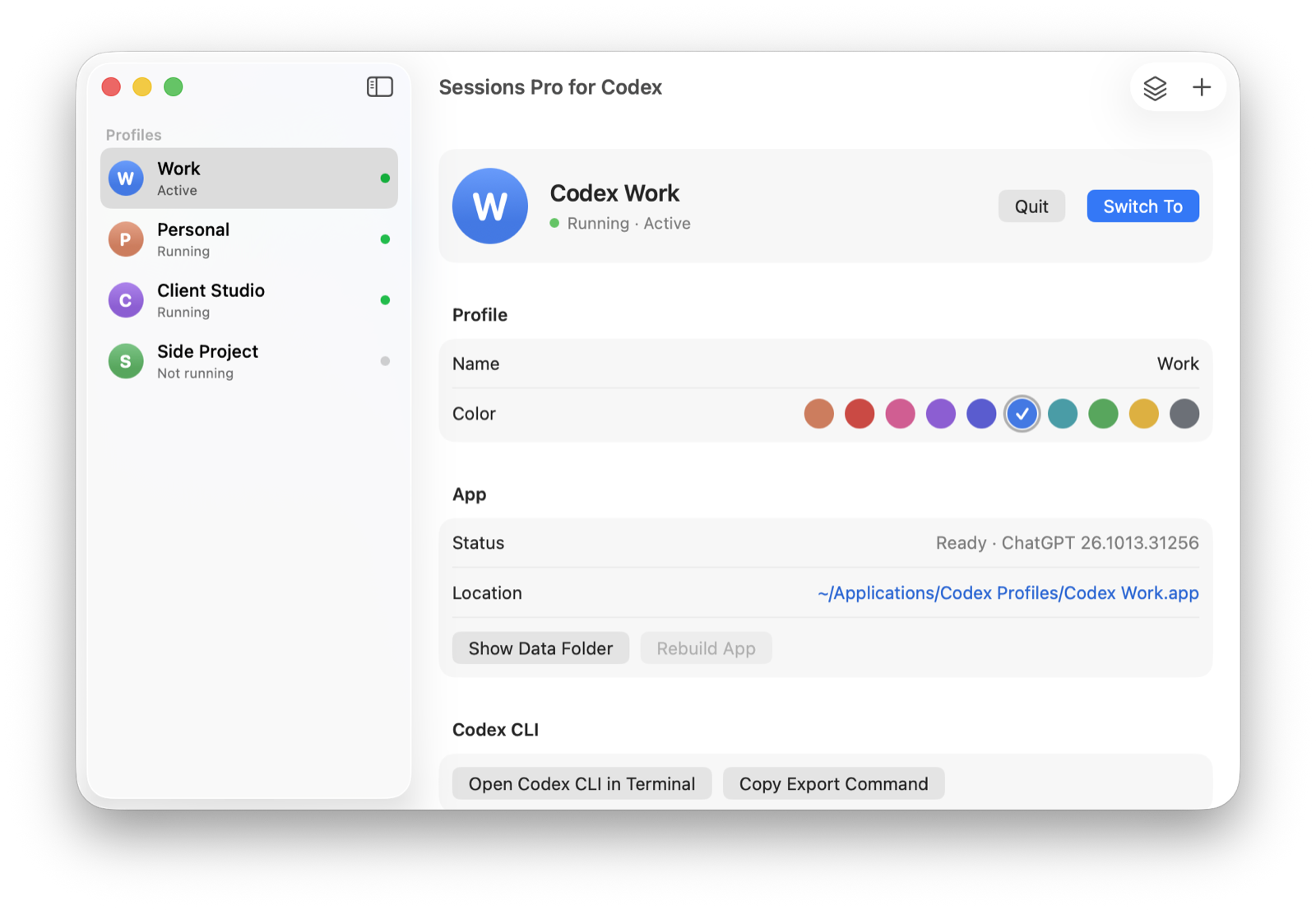
Example accounts. We make Sessions Pro for Codex.
What you get for every account
- Its own app. On a Mac, each profile has its own Dock icon with a colored letter badge and its own place in ⌘-Tab. On Windows, each runs in a window titled with its name, such as "ChatGPT — Work".
- Its own login. Every profile stays signed in to its own account. Signing in to one never signs you out of another.
- Its own history. Conversations, Codex threads, projects and pins stay with their account, so nothing gets mixed up.
- Its own Codex CLI. "Open Codex CLI in Terminal" runs the profile's
codexwith its ownCODEX_HOME, signed in to the same account as the app. - Its usage, at a glance. Each account's Codex session and weekly usage in your menu bar or tray, with alerts at 80% and 95%.
- A switcher. Switch accounts from the menu bar on a Mac or the tray on Windows, or open one that isn't running.
Already using ChatGPT? Choose "Start from my current ChatGPT" and your conversations, Codex threads, projects, pins and login are copied into a profile. The original app stays as it is. And it keeps ChatGPT up to date for you, with every profile on the latest version.
Where to get Sessions Pro for Codex
| Needs | Get it | |
|---|---|---|
| Mac | macOS 14 Sonoma or later, Apple silicon or Intel, with the ChatGPT desktop app | Download for macOS from this site |
| Windows | Windows 10 or 11, x64 or Arm, with the ChatGPT desktop app from the Microsoft Store | Get it from the Microsoft Store, or the direct installer on a PC that can't use the Store |
The Microsoft Store listing and the downloads on this site are the same app, from us. One license works on both, on up to 2 computers in any mix.
Up and running in a minute
- Install. Download Sessions Pro for Codex for Mac, or get it from the Microsoft Store on Windows. It finds the ChatGPT app on your computer.
- Bring your current ChatGPT. Choose "Start from my current ChatGPT" to copy what you have into a profile, for example "Codex Personal".
- Add your other accounts. Click +, name the profile, for example Work, and sign in with that account. Now both run side by side.
One price, no subscription
$24.99 once for a lifetime license on up to 2 computers, Mac or PC, with unlimited ChatGPT accounts. Need more computers? Add 3 more for $14.99, anytime. Try it free for an hour first; the hour starts once a profile is signed in. Not for you? Email us within 14 days for a full refund.
 Sessions Pro for Codex
Free 1-hour preview · 14-day refund · 2 computers, Mac or PC
Sessions Pro for Codex: FAQ
What is Sessions Pro for Codex?
An app for Mac and Windows that runs several ChatGPT and Codex accounts at the same time, each as its own app with its own login, Codex threads, projects, pins and Codex CLI.
Is Sessions Pro for Codex free?
You can try it free for 1 hour on each computer; the hour starts once you've signed in to a profile. After that, profiles need a license: $24.99 one-time for 2 computers, with a 14-day full refund. Without a license it keeps showing one account's Codex usage for free.
Is Sessions Pro for Codex on the Microsoft Store?
Yes. The Windows version is on the Microsoft Store, and it's the same app as the one on this site. On a PC that can't use the Store, for example a work PC, use the direct installer.
Is there a Mac version?
Yes. Download it from this site for macOS 14 Sonoma or later, on Apple silicon or Intel. One license covers Mac and Windows.
Is Sessions Pro for Codex on GitHub or open source?
No. It's a paid app from LEX GLOBAL IT S.R.L., and there's no GitHub version. Download it only from multiplecodex.com or the Microsoft Store.
Is it made by OpenAI?
No. It's an independent app from LEX GLOBAL IT S.R.L. It runs OpenAI's official ChatGPT desktop app with your own accounts, and OpenAI's terms apply to each account.
How is it different from ChatGPT's account switcher?
ChatGPT's switcher only works on the web version, with up to two accounts and one active at a time. Sessions Pro for Codex works in the desktop app, with every account open side by side. The two compared.
Does Sessions Pro for Codex see my chats?
No. Your conversations and logins stay between your computer and OpenAI. The app contacts its own server only to check your license and for its own updates.
Is it allowed to use multiple ChatGPT accounts?
Sessions Pro for Codex runs the official ChatGPT app with accounts you already have, such as a work account and a personal one. It doesn't change how ChatGPT or Codex work, and OpenAI's terms apply to each account. Use it for accounts you're allowed to have, not to get around usage limits.
Sessions Pro for Codex is made by LEX GLOBAL IT S.R.L. and is not affiliated with, endorsed by or sponsored by OpenAI. It runs the official ChatGPT app with accounts you already have, and OpenAI's terms apply to each account. ChatGPT and Codex are trademarks of OpenAI.