Short answer: all three are free command-line tools, and each stops short. codex-auth switches the active login, so one account works at a time and you restart Codex after every switch. codex-profiles has you build its Mac app yourself and has no Windows version. codex-multi-auth covers only the CLI. Sessions Pro for Codex is the installed app that does the whole job on Mac and Windows: every account open at once, each as its own ChatGPT app with its own Codex threads and CLI.
Free 1-hour preview once you've signed in to a profile. For macOS 14 or later, or Windows 10 or 11, with the ChatGPT desktop app.
What each tool asks of you
- codex-auth. Switches which account Codex is signed in to, so only one account works at a time. Its README says to restart the CLI or the app after every switch, calls its own
appcommand experimental, and warns that its usage refresh could violate OpenAI's terms of service. - codex-profiles. A command-line tool, with a Mac menu bar app that isn't a download: its README says there is no signed build yet, so you install Xcode's command line tools and build it yourself. No Windows version, and its quota reading follows the CLI sign-in, which can be a different account from the ChatGPT window.
- codex-multi-auth. Pools several sign-ins for the Codex CLI behind a local proxy and picks one per request. It needs Node 22.19 or later and does nothing for the ChatGPT desktop app. It can fail over to another account at a rate limit; its README says policy compliance is your responsibility, and OpenAI's Terms of Use forbid circumventing rate limits.
One app, nothing to build.
Sessions Pro for Codex is the finished version of what these tools make you assemble. Run the installer, add your accounts, and each one opens as its own ChatGPT app: its own Dock icon and colored badge on a Mac, its own titled window and taskbar button on Windows. Every account stays signed in and open at the same time, so there is nothing to switch and nothing to restart.
Each account keeps its own login, chats, Codex threads, projects and pins. "Codex CLI in Terminal" opens the CLI on the same account as the app. Your menu bar or tray shows every account's Codex usage, with alerts at 80% and 95%, and the app keeps each profile's ChatGPT up to date. Try it free for an hour once a profile is signed in; then it's $15 once for two computers, Mac or PC, with a 14-day refund.
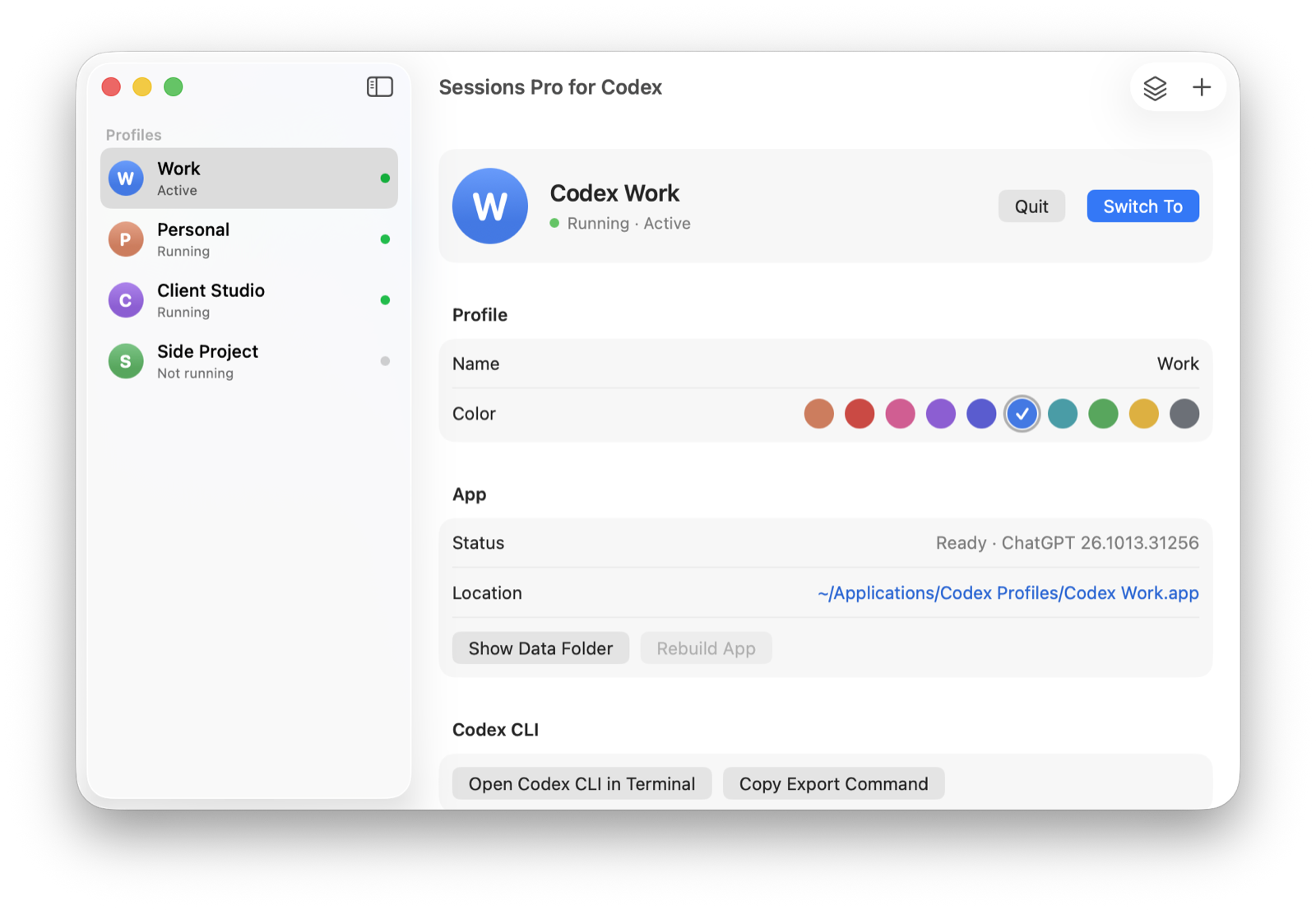
Example accounts. We make Sessions Pro for Codex.
Side by side, with Sessions Pro for Codex
| codex-auth | codex-profiles | codex-multi-auth | Sessions Pro for Codex | |
|---|---|---|---|---|
| What it is | Command-line switcher | Command-line tool and a Mac app you build | Command-line proxy | An installed app for Mac and Windows |
| Ready-made installer | ✕ npm | ✕ Build it yourself | ✕ npm | ✓ |
| Every account open in the desktop app | ✕ One at a time | Mac only | ✕ CLI only | ✓ Mac and Windows |
| No Terminal needed | ✕ | ✕ | ✕ | ✓ |
| Support and a refund | ✕ | ✕ | ✕ | ✓ 14 days |
| Cost | Free | Free | Free | $15 one-time |
From each project's README on 11 November 2026. We make Sessions Pro for Codex.
Why people pay $15 instead
- Nothing to build or maintain. One installer, and the app keeps every profile's ChatGPT on the latest version for you.
- Windows as well as Mac. One license covers 2 computers in any mix, so the laptop and the desktop work the same way.
- Every account is a real app. Its own icon, its own window, its own place in ⌘-Tab or Alt-Tab. You always know which account you are in.
- The app and the CLI agree. Each profile opens the Codex CLI on the same account, so you never run a task on the wrong login.
- You see limits coming. Every account's Codex usage sits in your menu bar or tray, with alerts before you run out.
- No risk in trying. Free for an hour, then $15 once, with a 14-day full refund.
 Sessions Pro for Codex
Free 1-hour preview · 14-day refund · 2 computers, Mac or PC
Every other way to do it, compared: the best ways to run multiple Codex accounts.
FAQ
What is codex-auth?
An open-source command-line tool that switches which account Codex is signed in to. One account is active at a time, and its README says to restart the CLI or app after switching. Sessions Pro for Codex keeps every account open at once instead.
What is codex-profiles?
An open-source command-line tool (the codex-profile command) that gives each account its own Codex folder. Its Mac app has no signed download yet, so you build it yourself, and there is no Windows version.
What is codex-multi-auth?
An open-source manager for the Codex CLI that keeps a pool of sign-ins and routes requests across them through a local proxy. It doesn't cover the ChatGPT desktop app.
Is there a ready-made app instead of these tools?
Yes. Sessions Pro for Codex installs like any app on Mac and Windows and runs each ChatGPT account as its own app, all signed in at once, each with its own Codex threads and Codex CLI. It's free to try for an hour, then $15 once.
Do these tools work with the ChatGPT desktop app?
Only partly. codex-auth's app command is experimental, codex-profiles opens ChatGPT windows on a Mac after you build its app, and codex-multi-auth is for the CLI. Sessions Pro for Codex is built for the desktop app on both Mac and Windows.
Is there a codex-profiles for Windows?
No: its README lists macOS and Linux for the command-line tool and macOS for the app. On Windows, Sessions Pro for Codex runs each account in its own ChatGPT window, all signed in at once.
Is it allowed to use multiple Codex accounts?
Sessions Pro for Codex runs the official ChatGPT app with accounts you already have, such as a work account and a personal one. It doesn't change how ChatGPT or Codex work, and OpenAI's terms apply to each account. Use it for accounts you're allowed to have, not to get around usage limits.
Sessions Pro for Codex is made by LEX GLOBAL IT S.R.L. and is not affiliated with, endorsed by or sponsored by OpenAI. It runs the official ChatGPT app with accounts you already have, and OpenAI's terms apply to each account. ChatGPT and Codex are trademarks of OpenAI.