Short answer: Codex is included in every ChatGPT plan, and usage is metered in windows: on Plus and Business, an estimated allowance per five-hour window, with weekly limits on top; Pro currently has no five-hour limit. At a limit, Plus and Pro can buy credits to keep going. Check what's left on the usage page in ChatGPT or with /status in the Codex CLI. Sessions Pro for Codex shows every account's usage in your menu bar or tray.
Free 1-hour preview once you've signed in to a profile. For macOS 14 or later, or Windows 10 or 11, with the ChatGPT desktop app.
Which plans include Codex?
According to OpenAI's pricing page, Codex (with ChatGPT Work) is included in ChatGPT Free, Go, Plus, Pro, Business, Edu and Enterprise. You can also use Codex with an OpenAI API key, billed at API rates instead of plan limits.
How the windows work
- Five-hour window. On Plus and Standard Business, OpenAI publishes estimated local messages per five-hour period. They're estimates, not fixed counts: bigger tasks and models use more.
- Weekly limit. Weekly limits may also apply on top of the five-hour window, and each resets on its own schedule.
- Pro. OpenAI says Pro plans currently have no five-hour limit. Enterprise and Edu on flexible pricing scale with credits instead of fixed limits.
Codex in the ChatGPT desktop app and the Codex CLI signed in to the same account draw from the same limits.
What happens at the limit
- Your current task can finish. OpenAI says Codex can keep working on the turn it's on, subject to fair use.
- Buy credits. Plus and Pro users can buy additional credits to keep working without changing plans; Business, Edu and Enterprise workspaces on flexible pricing buy workspace credits.
- Use an API key. Anyone can run extra local work with an API key, billed at standard API rates.
- Or wait for the reset. The usage page shows when each window resets.
Where to check your usage
- In ChatGPT: the Codex usage page shows your current limits and when they reset.
- In the Codex CLI:
during a session, run:/status - For every account at once: both of those show only the account you're signed in to. A usage tracker keeps every account's numbers in view.
Every account's usage, always in view.
Sessions Pro for Codex shows each ChatGPT account's Codex session and weekly usage, and when each resets, in the menu bar on a Mac or the tray on Windows, with alerts at 80% and 95%. No signing in and out to check another account.
It also runs each account as its own ChatGPT app, all signed in at once. After the free hour it keeps showing one account's usage for free, and a $24.99 one-time license shows every account.
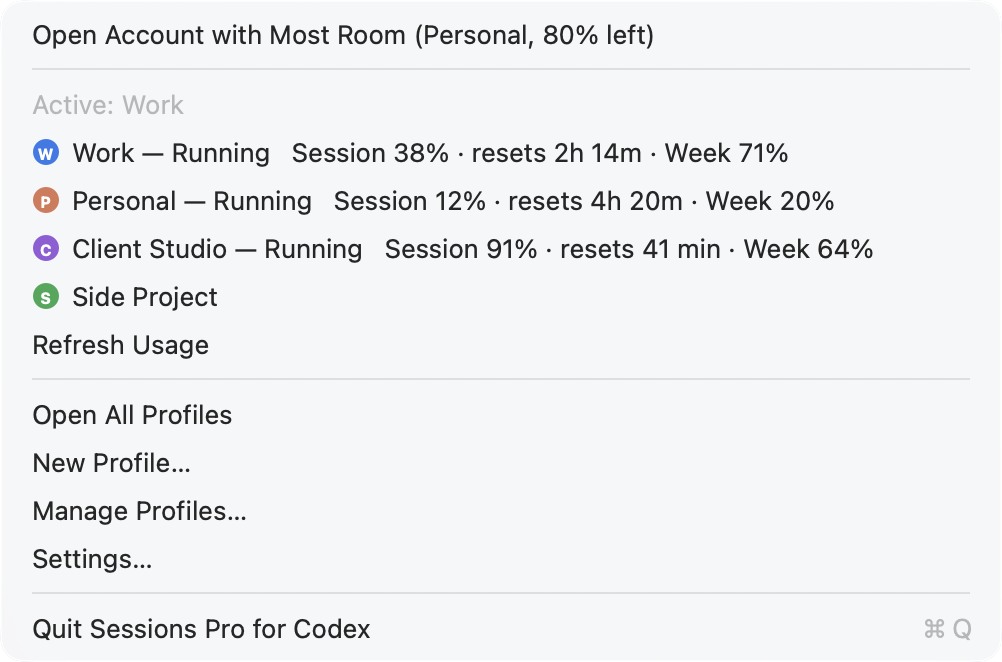
Example accounts. We make Sessions Pro for Codex.
Is it allowed to use several accounts?
Several accounts are for keeping work, personal and client work apart, not for stretching limits. Sessions Pro for Codex runs the official ChatGPT app with accounts you already have, such as a work account and a personal one. It doesn't change how ChatGPT or Codex work, and OpenAI's terms apply to each account. Use it for accounts you're allowed to have, not to get around usage limits.
 Sessions Pro for Codex
Free 1-hour preview · 14-day refund · 2 computers, Mac or PC
FAQ
What are the Codex usage limits?
On Plus and Standard Business, OpenAI estimates usage per five-hour window, and weekly limits may also apply. Pro currently has no five-hour limit. Exact allowances depend on the model and the size of each task; OpenAI's pricing page has the current estimates.
How do I check my Codex usage?
Open the Codex usage page in ChatGPT, or run /status during a Codex CLI session. Both show the account you're signed in to.
What happens when I hit the Codex limit?
Codex can finish the turn it's on. Plus and Pro users can buy credits to keep going, anyone can use an API key at API rates, or you can wait for the window to reset.
Is it allowed to use multiple ChatGPT accounts?
Sessions Pro for Codex runs the official ChatGPT app with accounts you already have, such as a work account and a personal one. It doesn't change how ChatGPT or Codex work, and OpenAI's terms apply to each account. Use it for accounts you're allowed to have, not to get around usage limits.
Sessions Pro for Codex is made by LEX GLOBAL IT S.R.L. and is not affiliated with, endorsed by or sponsored by OpenAI. It runs the official ChatGPT app with accounts you already have, and OpenAI's terms apply to each account. ChatGPT and Codex are trademarks of OpenAI.