Short answer: if you are in the ChatGPT desktop app on a Mac or a PC, nothing is broken: OpenAI's account switcher exists on the web and in the iPhone and Android apps, not in the desktop app. On a phone it is still rolling out, so it may not have reached your account. And everywhere it stops at two accounts, one active at a time. To have every account open in the desktop app, where Codex works, give each account its own app with Sessions Pro for Codex.
Free 1-hour preview once you've signed in to a profile. For macOS 14 or later, or Windows 10 or 11, with the ChatGPT desktop app.
First: which ChatGPT are you in?
- The desktop app. On a Mac or a PC there is no "Switch account" to find. OpenAI lists account switching for the web and the mobile apps only, so in the desktop app the only way to change accounts is to log out.
- The phone app. Switching is rolling out on iPhone and Android. OpenAI's help page says that if you don't see Switch account in Settings, it may not be available to you yet.
- chatgpt.com. Here it works: open the account menu, choose Add account, and switch between two signed-in accounts, one active at a time.
Four reasons switching fails
- You are in the desktop app. There is no switcher in the ChatGPT app for Mac or Windows. This is the most common cause, and no setting turns it on.
- The mobile rollout hasn't reached you. Update the app and look in Settings again later. Until then, the phone app holds one account.
- Two accounts are already signed in. Two is the limit. On a phone, Add account is hidden once two are signed in; on the web you pick one to log out before adding a third.
- Your company turned it off. For an Enterprise workspace, the owner can allow or block account switching. If it is blocked, only they can change that.
Even when it works, it only goes so far
- One account at a time. The other account is signed in but idle. You can't have a work task and a personal one running together.
- Nothing in the desktop app. Codex works in folders on your computer through the desktop app, and that is exactly where switching doesn't exist.
- Easy to act in the wrong account. OpenAI's own advice is to check which account is active before you start a conversation or buy anything.
The fix for the desktop app: stop switching.
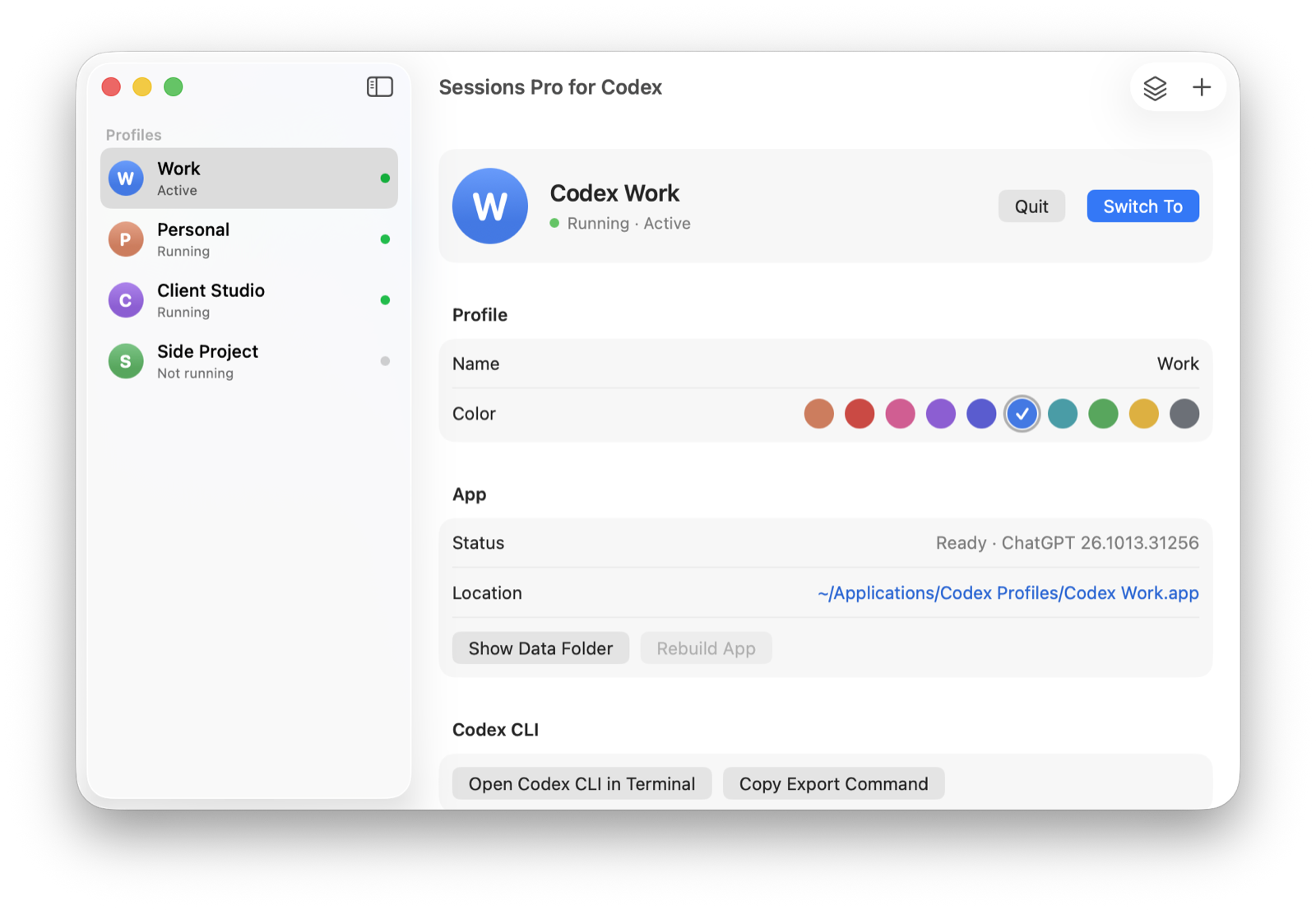
Sessions Pro for Codex gives each account its own copy of the ChatGPT desktop app. On a Mac that is an app per account, each with its own Dock icon and colored badge; on Windows, a window per account with its own taskbar button. Every account stays signed in and open at the same time, so there is no switcher to go missing.
It isn't capped at two, each account keeps its own chats, Codex threads, projects and Codex CLI, and the account you are in is written on the window. Try it free for an hour once a profile is signed in; then it's $15 once for two computers, Mac or PC, with a 14-day refund.
| Web switcher | Phone switcher | Sessions Pro for Codex | |
|---|---|---|---|
| Works in the desktop app | ✕ | ✕ | ✓ Mac and Windows |
| Accounts signed in | 2 | 2 | As many as you have |
| Active at the same time | ✕ One | ✕ One | ✓ All of them |
| Codex threads per account | Web only | ✕ | ✓ |
| Cost | Free | Free | $15 one-time |
Example accounts. We make Sessions Pro for Codex.
 Sessions Pro for Codex
Free 1-hour preview · 14-day refund · 2 computers, Mac or PC
Want the steps for changing accounts by hand in each place? See how to switch Codex accounts.
FAQ
Why is there no Switch account option in the ChatGPT desktop app?
Because the desktop app for Mac and Windows doesn't have one. OpenAI offers account switching on ChatGPT web and in the iPhone and Android apps. In the desktop app you log out and in, or run each account as its own app with Sessions Pro for Codex.
Why can't I add a third ChatGPT account?
Account switching keeps up to two accounts signed in. To add another you log one out first. Sessions Pro for Codex has no cap of two in the desktop app.
Why don't I see Switch account on my iPhone or Android phone?
It is still rolling out, so it may not have reached your account yet. Update the app and check Settings again later.
Can my employer block account switching?
Yes. The owner of an Enterprise workspace can turn account switching on or off for the workspace.
Sessions Pro for Codex is made by LEX GLOBAL IT S.R.L. and is not affiliated with, endorsed by or sponsored by OpenAI. It runs the official ChatGPT app with accounts you already have, and OpenAI's terms apply to each account. ChatGPT and Codex are trademarks of OpenAI.