Short answer: there isn't one fixed time: Codex has a five-hour limit and a weekly limit, and each resets on its own. OpenAI doesn't publish a clock time; it tells you to check your usage dashboard for current limits and reset times. Open the Codex usage page in ChatGPT and you'll see when each one resets for the account you're signed in to; /status in the CLI shows your current limits. Sessions Pro for Codex shows both resets for every account in your menu bar or tray.
Free 1-hour preview once you've signed in to a profile. For macOS 14 or later, or Windows 10 or 11, with the ChatGPT desktop app.
Where to see your reset time
- In ChatGPT: open the Codex usage page. It lists your current limits and when each resets.
- In the Codex CLI:
during a session, type this to see your current limits./status - In the app's settings: OpenAI points to Settings → Usage in ChatGPT, or Usage & Billing in the Codex app, for your usage and the options on your account.
All three show one account: the one you are signed in to. If you have a work account and a personal one, checking the other means signing out and in.
Which limit did you hit?
- The five-hour limit. The short one. On Plus and standard Business seats, usage is measured over a five-hour period, so this limit clears the same day.
- The weekly limit. The long one. Weekly limits may apply on top, and running into this one can mean waiting days, not hours.
- On Pro. OpenAI says Pro plans currently have no five-hour limit, so on Pro it is the weekly limit that matters.
The usage page shows which one you have reached. How the limits work on each plan.
What you can do before it resets
- Let the current turn finish. OpenAI says Codex can keep working on the turn it is on, subject to fair use.
- Buy credits. Plus and Pro users can buy credits to carry on without changing plan. Credits pay for extra usage; they don't move usage between accounts.
- Use an API key. Extra local work can run on an API key, billed at API rates.
- Plan the week. If the weekly limit is the one you keep hitting, the fix is to see it coming, not to find out mid-task.
Every account's reset, always on screen.
Sessions Pro for Codex puts each ChatGPT account's Codex usage in your menu bar on a Mac or your tray on Windows: the session limit, the weekly limit, and when each one resets. It warns you at 80% and again at 95%, so the limit never arrives as a surprise in the middle of a task.
Because each account runs as its own app, you see work and personal side by side and never sign out to check the other one. After the free hour it keeps showing one account's usage for free; a $15 one-time license shows every account.
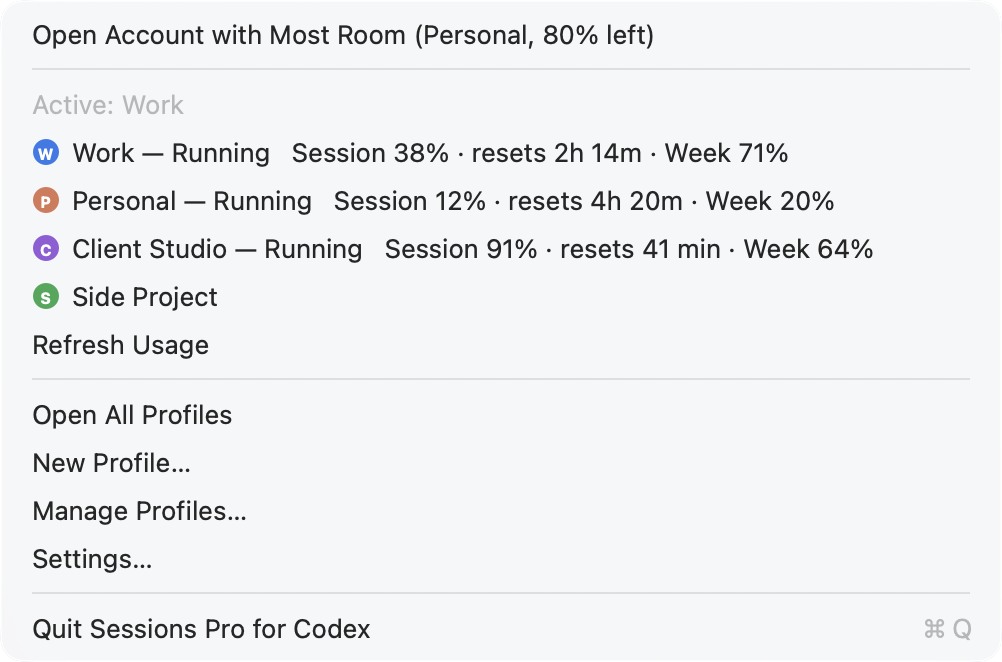
Example accounts. We make Sessions Pro for Codex. It shows each account's own usage and doesn't change or pool limits.
 Sessions Pro for Codex
Free 1-hour preview · 14-day refund · 2 computers, Mac or PC
Looking for the tracker itself? See how to check Codex usage for every account.
FAQ
When does the Codex usage limit reset?
There are two limits, a five-hour one and a weekly one, and each resets separately. Your exact reset times are on the Codex usage page in ChatGPT.
How do I check when my Codex limit resets?
Open the Codex usage page in ChatGPT. Sessions Pro for Codex also shows the reset time for every account in your menu bar or tray.
Does the Codex weekly limit reset on a fixed day?
OpenAI doesn't publish a fixed day. It says to check your usage dashboard for current limits and reset times, which shows the reset for your account.
Does buying credits reset my Codex limit?
No. Credits pay for usage beyond your included limit so you can keep working; the limit itself still resets on its own schedule.
Can I see the reset time for two accounts at once?
Not in ChatGPT, which shows the account you're signed in to. Sessions Pro for Codex shows every account's limits and reset times together.
Sessions Pro for Codex is made by LEX GLOBAL IT S.R.L. and is not affiliated with, endorsed by or sponsored by OpenAI. It runs the official ChatGPT app with accounts you already have, and OpenAI's terms apply to each account. ChatGPT and Codex are trademarks of OpenAI.